FIle Prep Specifications:
To expedite your order, please follow these guidelines:
Adobe Photoshop
- Must be a minimum of 300 DPI
- Save layered files as PSD—do not flatten (raster)
- Color (Image) Mode: RGB
Adobe Illustrator
- Save vector graphics as an
AI, PDF, or EPS file
- All text must be converted to outlines or links supplied
Adobe PDF
- Save PDF with editing capabilities
- ALL layers must be vectored
- Embed all fonts, supply links to fonts, or outline/rasterize text
If any fonts used require a fee to purchase. We will pass along the cost of the font file to you.
Artwork and Logo Submissions
To expedite your order, please follow these guidelines:
Logos
Accepted File Formats:
PDF • AI • EPS • PSD • JPG • JPEG • TIF • TIFF • PNG
Text in Logos:
- Have any fonts converted to outlines or supply links to used fonts.
Art must NOT
- Be one of the following: BMP, GIF, JPG, JPEG, PNG with a white or black background.
- Must not be a scanned or faxed copy.
- DO NOT send a logo word doc(x).
Invitations, ads, flyer, etc…
Art MUST
- Be one of the following file formats:
AI, EPS, Adobe Layered PDF, PSD, or TIFF.
- Have any fonts converted to outlines or supply links to used fonts.
Art must NOT
- Be one of the following: BMP, GIF, JPG, JPEG, PNG, flattened PDF.
- Must not be a scanned or faxed copy.
- DO NOT send a logo word doc(x).
Notice: ALL animation work will be charged half up front and the remainder on delivery. This will be a proof fee which is non-refundable.
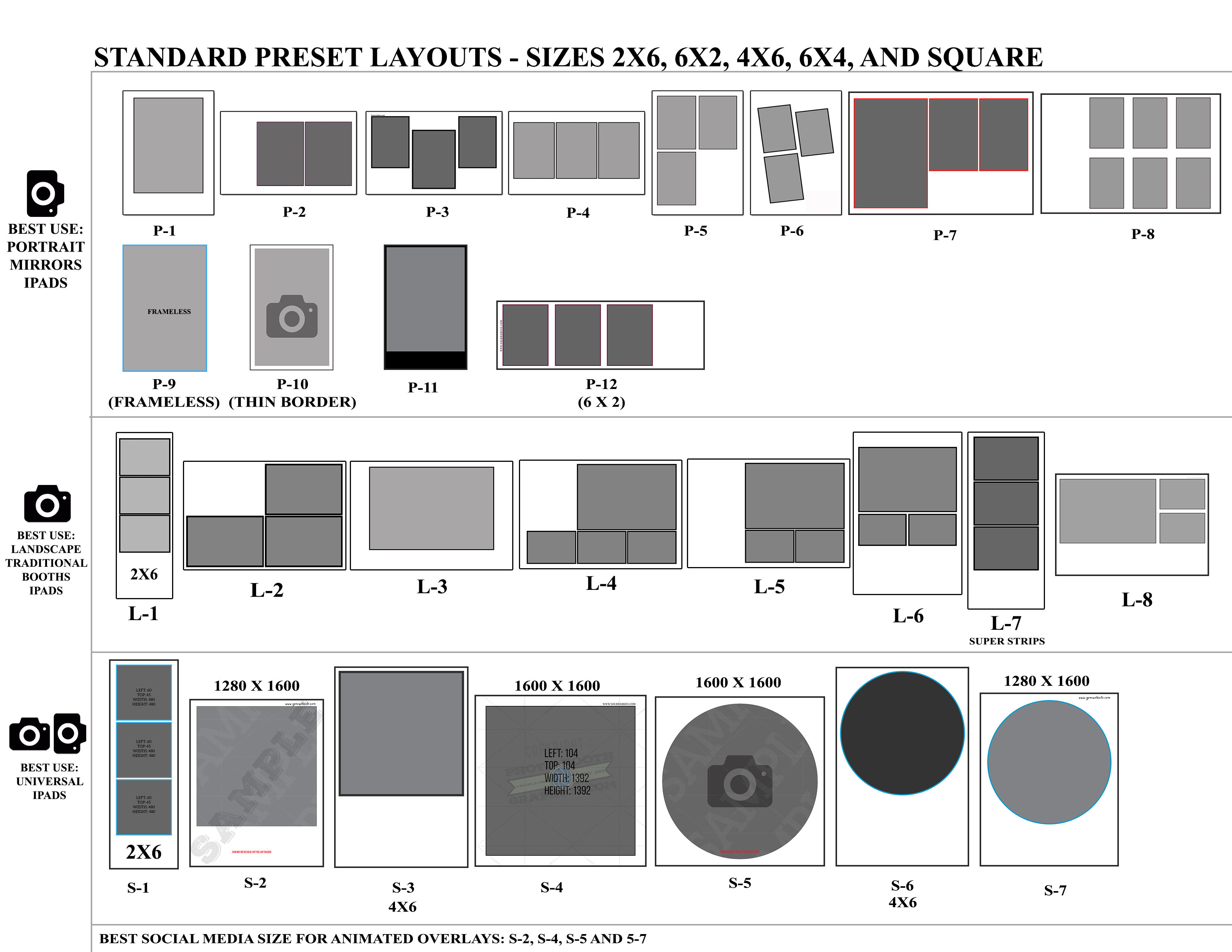
Layout Examples
Below are the templates we use when building out your custom templates. P is our “portrait photo”, L is “Landscape photos”, and S is “Square Photo.”
Recommendations: If you have a traditional booth with a DSLR use L1-L8, If you have a mirror or a portrait DLSR camera booth use P1-P8. If you are using and iPad you can use any layout in the image.
If you are using an iPad and want to only social share. We suggest using S2, S4, or S5.